If you’ve ever found yourself stuck in a long queue at a government office, you know how frustrating it can be to navigate endless paperwork. Thankfully, the Government of Andhra Pradesh has completely transformed how citizens interact with public administration. Originally known as MeeSeva AP (which translates to “At Your Service” in Telugu), the state’s flagship e-governance platform has evolved into the highly integrated AP Seva Portal.
Whether you’re a student looking to download an income certificate, a homebuyer checking land records, or an entrepreneur hoping to set up a local kiosk, this digital gateway is designed to make your life easier. In this guide, we’ll walk you through everything you need to know about the AP Seva login process, how to effortlessly track your application status, and even what to do if your paperwork gets delayed.
What is the MeeSeva AP (AP Seva) Portal?
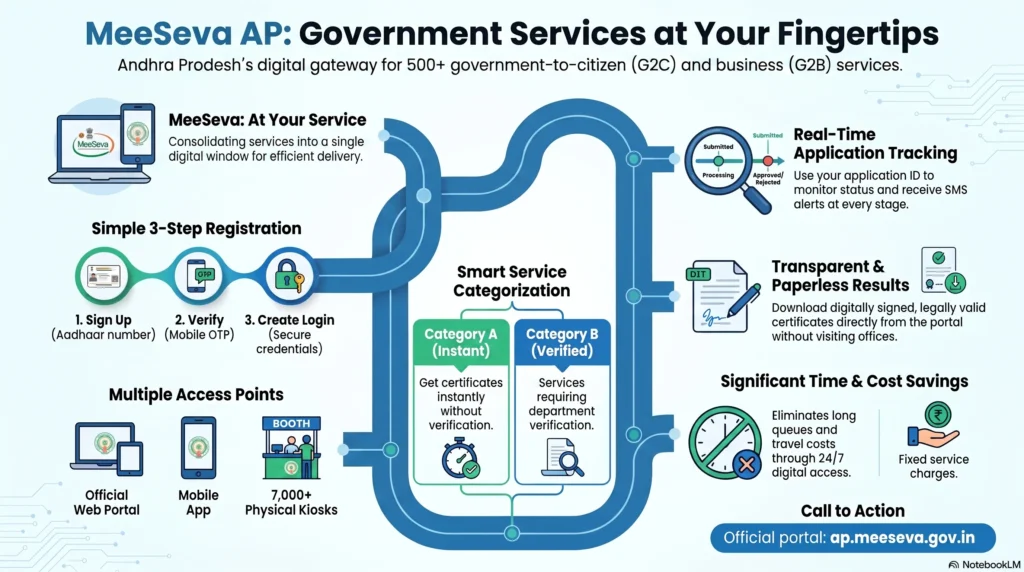
The AP Seva Portal is Andhra Pradesh’s unified digital platform that brings hundreds of Government-to-Citizen (G2C) and Government-to-Business (G2B) services under a single roof. Instead of running from one municipal department to another, citizens can now handle their administrative tasks from their smartphones or local neighborhood kiosks.
To make this happen, the state deeply integrated the portal into the decentralized Grama Ward Sachivalayam system. Today, there are over 15,004 localized physical secretariats staffed by over 1.3 lakh employees right in your neighborhood. Currently, the portal supports over 540 distinct services across 35 different government departments, comfortably processing over 10 million transactions every month.
Key Services Offered on the AP MeeSeva Portal
The portal acts as a true single-window delivery system, eliminating the need to physically visit multiple administrative offices.
Revenue and Land Records
The Revenue Department sees some of the highest traffic on the portal. You can quickly apply for essential documents like Income Certificates, Caste Certificates, Residence Certificates, and Legal Heir Certificates. Furthermore, the platform integrates specialized land services such as Bhuseva and Bhudaar, which assign a unique 11-digit identification number to land parcels, making it incredibly easy to verify property boundaries before buying or securing a mortgage.
Welfare Schemes and Education
AP Seva is also your gateway to state welfare initiatives. For students, it serves as the backbone for the JnanaBhumi portal, managing Post Matric Scholarships and fee reimbursement schemes (like Jagananna Vidya Deevena).
Municipal and Utility Services
For everyday civic needs, the portal connects you directly with local municipal bodies. You can seamlessly apply for birth and death certificates, register for municipal water connections, and pay property taxes and electricity bills securely.
How to Register and Login to the AP Seva Portal
While you can always visit a physical kiosk to have a Village Level Entrepreneur (VLE) submit requests for you, creating your own account lets you handle applications directly from your couch.
Documents Required for Registration
Before diving into the MeeSeva portal registration, make sure you have the following ready:
- Aadhaar Card: Mandatory for biometric and identity authentication.
- Active Mobile Number and Email ID: Needed for OTP verification and alerts.
- Valid Address Proof: A recent utility bill, ration card, or voter ID.
Step-by-Step Registration Process
- Visit the official MeeSeva/AP Seva portal and click on New User Registration.
- Enter your desired login name, Aadhaar number, mobile number, email, and residential address.
- Click ‘Submit’ to send a One-Time Password (OTP) to your phone.
- Enter the OTP and click the activation link sent to your email to make your account live.
- Head back to the AP Seva portal login page, enter your new credentials, solve the captcha, and you’re in!
How to Check MeeSeva Application Status & Download Certificates
One of the best things about the AP Seva portal is the complete transparency it provides. You never have to wonder where your file is stuck.
Tracking Your Application
When you submit an application, you are given a unique acknowledgment number (Transaction ID). To check your MeeSeva application status, simply enter this number or your Aadhaar number into the ‘Track Your Application’ section. The dashboard will show you exactly which official is holding your file and whether it has been approved.
Verifying Certificates with AP DigiVerify
Document fraud used to be a major headache. To solve this, Andhra Pradesh integrated AP DigiVerify, a highly secure blockchain-based ledger developed by GISFY. Once your certificate is issued, it is stored immutably. Anyone, including employers or universities, can instantly verify your printed certificate by scanning its embedded QR code.
What to Do If Your MeeSeva Application is Delayed?
The portal operates under strict Service Level Agreements (SLAs), meaning officials are supposed to process applications within specific timeframes. However, backlogs happen.
Filing an RTI for Stuck Applications
Remember, MeeSeva is just the digital front desk. The actual processing is handled by the relevant department (like the Tahsildar or MRO). If your application has been stuck for 15 to 30 days, you have the legal right under the RTI Act, 2005 to demand answers.
Steps to File an RTI
You can file an RTI online or via registered post to the Public Information Officer (PIO) of the issuing department. Be sure to quote your transaction ID and ask specifically for the daily progress report of your file, the name of the officer holding it, and the recorded reasons for any delay or rejection.
How to Open an AP MeeSeva Franchise Center
To ensure deep rural penetration, the government uses a micro-franchise model. This authorizes local Village Level Entrepreneurs (VLEs) to operate physical MeeSeva kiosks, turning e-governance into a brilliant self-employment opportunity.
Eligibility and Infrastructure Requirements
To become an authorized operator, you need to meet a few strict guidelines:
- Basic Eligibility: You must be an AP resident, at least 18 years old, have a minimum 10th-grade education, and possess basic computer literacy.
- Required Infrastructure: You will need a dedicated commercial office space, a PC or laptop, high-speed internet, a multi-function scanner/printer, and reliable power backup.
Conclusion
The MeeSeva / AP Seva Portal has fundamentally changed how Andhra Pradesh functions, bringing transparent, fast, and secure governance right into your living room. Whether you are applying for a critical certificate or tracking a delayed document, mastering this portal empowers you to cut through the red tape with just a few clicks!